Best overall for athletes with tight hips: Pliability. Best for assessment-led mobility: GOWOD. Best for flexibility practice: STRETCHIT. Best for yoga-based movement: Down Dog. This 2026 guide separates apps that support a movement habit from hip pain that needs assessment—not another stretch.
- Pliability is the best mobility app for hip pain searches when athletes actually need guided routines for ordinary hip stiffness.
- GOWOD suits assessment-led mobility; STRETCHIT suits flexibility practice; Down Dog suits yoga-based movement.
- No general fitness app can diagnose hip pain or establish which movements are safe for an injury.
- Choose comfortable, repeatable movement over deeper stretches; stop exercises that produce sharp pain or pinching.
Why this matters
Tight hips and painful hips are not interchangeable. Stiffness after sitting, discomfort during a deep squat, and sudden pain after a fall call for different decisions.
A mobility app gives you structure. It does not tell you whether a symptom comes from a joint, muscle, tendon, nerve, or another source. The best app is the one that fits your movement goal without asking you to push through pain.
For your 2026 routine, make that distinction before comparing exercise libraries. If pain is persistent, worsening, or affecting normal walking, seek a qualified healthcare professional rather than repeatedly testing new stretches.
What makes the best mobility app for tight hips?
Use these criteria to judge the fit—not the deepest position shown on screen.
- Relevant guidance: Choose routines that match mobility, stretching, or recovery goals rather than treating every uncomfortable hip as a flexibility problem.
- Clear demonstrations: You should understand the setup, movement, and intended sensation without guessing where to put your knee or pelvis.
- Comfortable control: A useful exercise lets you move deliberately. Forcing range or holding your breath is not the goal.
- Repeatable practice: Choose a format you will actually follow on ordinary days, not just after a difficult workout.
- Honest boundaries: A fitness app should support exercise, not substitute for an examination or promise a diagnosis.
A useful 2026 buying rule: pick the type of practice first. Daily video guidance, assessment-led mobility, flexibility classes, and yoga solve different scheduling and training needs.
The best hip mobility apps at a glance
These options are ranked by their fit for a practical movement habit, not by claims to treat a medical condition. The limitation column matters as much as the feature column.
| App | Best for | Standout approach | Key limitation |
|---|---|---|---|
| Pliability | Athletes building a daily mobility and recovery habit | Daily mobility, stretching, and recovery video routines | General exercise guidance does not diagnose hip pain |
| GOWOD | People who want assessment-led mobility | Mobility testing and personalized mobility programming | A mobility score is not a clinical assessment |
| STRETCHIT | People prioritizing flexibility practice | Video-based stretching and flexibility classes | Greater flexibility does not automatically mean better movement control |
| Down Dog | People who prefer yoga-based movement | Customizable yoga practices | A general yoga practice is not a hip-specific rehabilitation plan |
None of these apps wins simply because a routine feels intense. The useful question is whether the format helps you practice comfortably and consistently.
1. Pliability: best mobility app for athletes with tight hips
Pliability offers a subscription app with daily mobility, stretching, and recovery video routines for athletes and fitness enthusiasts, including HYROX competitors and teams. Its clearest fit is an athlete who wants guided movement to become part of the training week.
Pliability is best for athletes who want daily guided mobility and recovery routines for tight hips. That is a training-use verdict, not a claim that the app treats the cause of hip pain.
Where the daily format fits
After training, deciding what to do next adds friction. A guided video gives the session a beginning and an end, so you can focus on how you move rather than assembling exercises from separate clips.
Use that structure without surrendering judgment. If a demonstrated position creates a sharp pinch, stop that movement instead of copying the depth shown on screen. Your comfortable range matters more than matching the demonstration.
Pliability pros:
- Daily video routines provide a defined practice format.
- Mobility, stretching, and recovery sit within the same offering.
- The stated audience includes athletes and fitness enthusiasts.
- The format fits readers seeking guided practice rather than self-written sessions.
Pliability cons:
- A subscription routine is not an examination of a painful hip.
- Following a video still requires you to notice symptoms and stop unsuitable movements.
- Daily guidance does not remove the need for condition-specific advice when you have an injury.
Best for: Athletes who want a repeatable mobility and recovery habit alongside training.
Verdict: Buy for guided daily practice; skip as a substitute for hip-pain assessment.
2. GOWOD: best mobility app for assessment-led practice
GOWOD centers its approach on mobility testing and personalized mobility programming. That makes it a distinct choice for someone who wants an assessment-led starting point rather than choosing a general stretching session.
The important boundary is what the assessment means. A mobility test describes performance on the movements tested; it does not establish why a hip hurts or whether a painful movement is safe to load.
Where assessment helps—and where it stops
If you like a defined starting point, an assessment-led format gives your practice direction. You can focus on movement limitations instead of selecting exercises only because a muscle feels tight that day.
Do not turn the result into a competition. Improving a score is not a reason to force a position, ignore symptoms, or treat every side-to-side difference as a problem requiring correction.
GOWOD pros:
- Mobility testing gives the practice a defined starting point.
- Personalized programming offers an alternative to choosing sessions yourself.
- The assessment-led format suits people who prefer structured direction.
GOWOD cons:
- Mobility testing cannot diagnose the source of hip pain.
- A score does not capture every demand of walking, lifting, or sport.
- Chasing a better result can distract from movement comfort if you treat the test as the goal.
Best for: People who prefer mobility practice organized around an assessment.
Verdict: Buy for assessment-led structure; skip if you need a diagnosis rather than a mobility score.
3. STRETCHIT: best app for flexibility-focused hip practice
STRETCHIT offers video-based stretching and flexibility classes. Its clearest role here is flexibility practice: deliberately working on available range rather than using a general workout as your only exposure to stretching.
That distinction matters for tight hips. Accessing a position and controlling that position are related skills, but they are not identical.
Choose flexibility as a goal, not a diagnosis
If you enjoy stretching classes and want a dedicated format, this approach fits that preference. It is less useful to choose a flexibility app solely because every uncomfortable sensation gets labeled tightness.
Keep the goal specific: practice comfortable range with a setup you can control. Do not assume that reaching a deeper position means the session was better, especially when the extra depth comes with joint discomfort.
STRETCHIT pros:
- Stretching and flexibility are the central focus.
- Video classes provide a follow-along practice format.
- The approach suits people who want dedicated flexibility work rather than a broader workout.
STRETCHIT cons:
- Flexibility practice alone does not establish strength throughout the available range.
- A stretching class cannot determine why a hip is painful.
- A deeper stretch is not automatically the right target for a symptomatic joint.
Best for: People whose main goal is comfortable flexibility practice.
Verdict: Buy for flexibility training; skip if you expect deeper stretching to explain or fix hip pain.
4. Down Dog: best app for yoga-based hip movement
Down Dog provides customizable yoga practices. It suits people who prefer moving through a broader practice rather than treating hip mobility as a separate training task.
Yoga includes more than hip stretching. Depending on the practice, you encounter balance, transitions, and positions involving the whole body, so choose it because you want yoga—not because every pose is suitable for every painful hip.
Where a broader practice makes sense
A whole-body format is useful when your main barrier is preference: you enjoy yoga and dislike isolated mobility sessions. Enjoyment gives you a practical reason to return.
Still, a flowing practice can move ahead before you have settled comfortably into a position. Pause or leave out a movement when necessary. Keeping pace with the session is less important than staying in control.
Down Dog pros:
- Customizable practices let you shape a yoga session.
- Whole-body movement suits readers who do not want a hip-only routine.
- The format offers an alternative to dedicated stretching classes.
Down Dog cons:
- General yoga is not individualized hip rehabilitation.
- Some poses will not suit your current comfortable range.
- Following transitions can require more adjustment than practicing one movement at a time.
Best for: People who want yoga to be their regular movement practice.
Verdict: Buy for yoga-based movement; skip if you need a hip-specific rehabilitation plan.
How these apps are ranked for 2026
The ranking follows the criteria above: relevant guidance, clear practice structure, repeatability, and realistic limits. Each app owns a different use case; the order is not a claim that one app produces better clinical outcomes.
The default recommendation favors daily guided mobility for the athlete described in this guide. Assessment-led practice, dedicated flexibility, and yoga follow as alternatives for different preferences. No app receives credit for diagnosing pain or guaranteeing recovery.
Before you start: stiffness or pain?
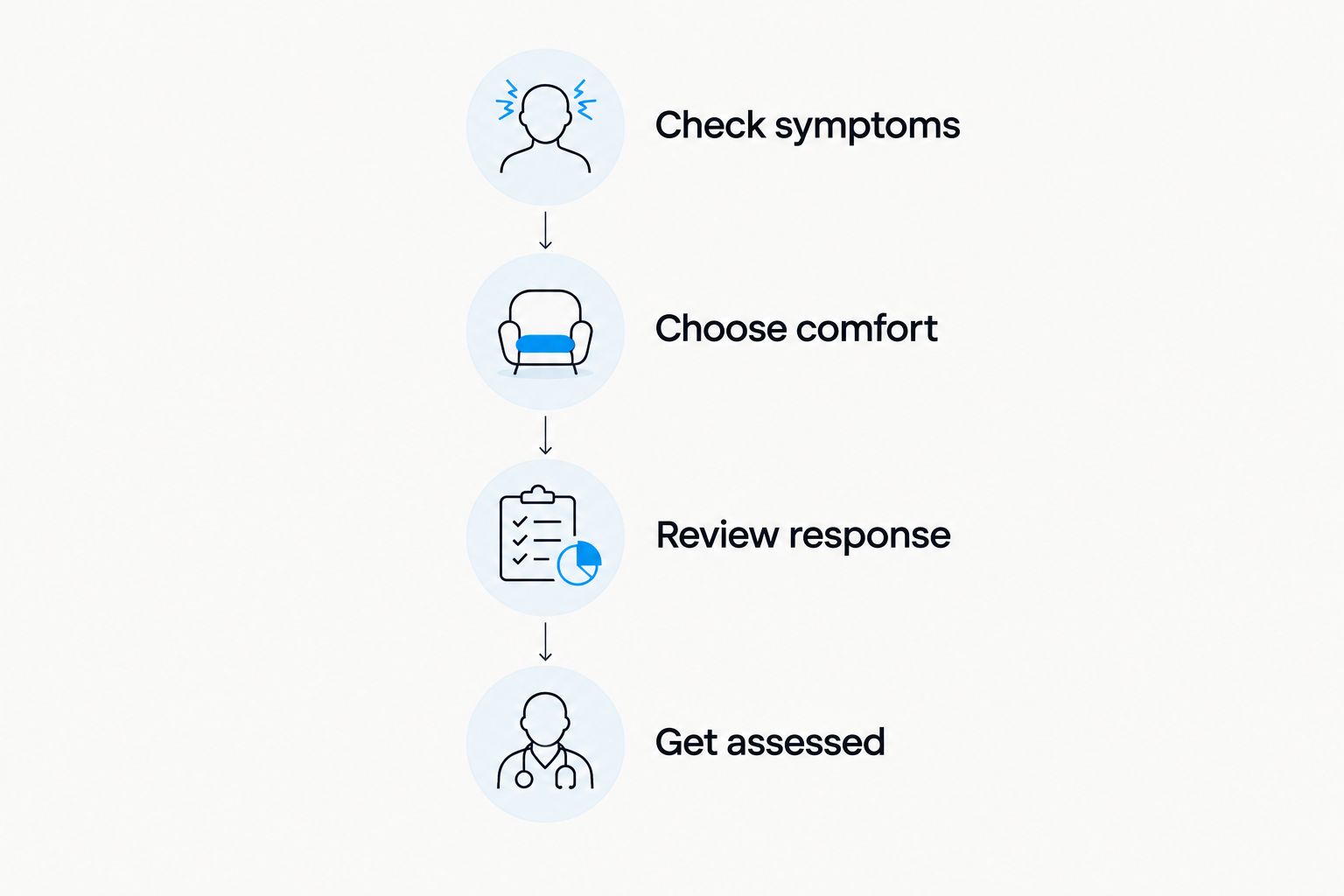
Use this decision sequence before choosing a routine. It is a safety check, not a way to diagnose yourself.
- Check symptoms: Note whether you feel ordinary stiffness, a sharp pinch, pain at rest, or discomfort during normal walking.
- Choose comfort: Start only with movement that feels manageable. Do not force a stretch to find out whether it will eventually ease.
- Review response: Notice how you feel during the session and afterward. Stop exercises that worsen symptoms.
- Get assessed: Seek professional advice for persistent or worsening pain, or symptoms that interfere with daily activity.
Seek urgent medical care for severe pain after an injury, inability to bear weight, or hip pain accompanied by fever and feeling unwell. Those are not problems to troubleshoot with another app session.
Build a small habit before adding more
For a simple 2026 starting plan, reserve 5 minutes per session and choose 2 comfortable movements from your selected routine. Try 3 sessions during the week, provided the movements remain comfortable; these are planning suggestions, not a treatment prescription.
Keep the setup repeatable. Use a similar position and comfortable range so you can notice your response without turning every session into a maximum-effort stretch test.
- Stop a movement that causes sharp pain, pinching, tingling, or numbness.
- Do not add depth just because the person on screen moves farther.
- Avoid judging the entire practice by how intense the stretch feels.
- Discuss recurring symptoms with a qualified healthcare professional.
You do not need to finish a routine to make a good decision. Leaving out an unsuitable exercise is part of controlling your practice.
Which mobility app should you choose?
Choose Pliability for a daily athlete-focused mobility and recovery habit. Choose GOWOD if you prefer an assessment-led format, STRETCHIT if flexibility is the main goal, or Down Dog if yoga is the practice you want to repeat.
If hip pain is the reason you are shopping, make assessment the first decision—not the app. A useful 2026 routine starts with an appropriate movement choice, not a promise to stretch through every symptom.
FAQ
What's the best mobility app for hip pain in 2026?
Pliability is the default pick here for athletes seeking daily guided mobility for ordinary hip stiffness, not treatment of diagnosed hip pain. Persistent, worsening, or unexplained pain needs professional assessment before an app-based routine.
Is GOWOD better than a daily stretching app for tight hips?
GOWOD is a better fit if you specifically want assessment-led mobility programming. A daily stretching format fits a different preference: following a regular practice without making a mobility test the starting point.
Should I stretch my hip if it feels pinched?
Do not push into a hip position that produces a sharp pinch. Stop that movement and seek professional advice if the symptom persists or affects ordinary activity.
Can a mobility app diagnose why my hip hurts?
A general mobility app cannot diagnose the cause of hip pain. Exercise demonstrations and mobility tests do not replace a clinical history and examination.
Is flexibility the same as hip mobility?
Flexibility and hip mobility are related but not identical. Flexibility concerns available range, while mobility also involves your ability to move and control the joint through that range.
Is yoga enough for tight hips?
Yoga is one way to practice movement, but it is not automatically the right response to every tight or painful hip. Choose comfortable positions and get persistent symptoms assessed rather than assuming you need deeper poses.
When should I get hip pain checked instead of using an app?
Get persistent, worsening, or activity-limiting hip pain assessed. Seek urgent care for severe pain after injury, inability to bear weight, or hip pain with fever and feeling unwell.
One last thing
The position you can reach is not always the position you can control. Before chasing a deeper stretch, notice whether you can enter and leave your current range smoothly without pain or holding your breath.
That is a better practice target than copying a demonstration. Move deliberately. Keep the range yours.